The Pomodoro Technique: A Complete Guide to Focused Productivity
Published on January 11, 2026 by The Kestrel Tools Team • 8 min read
You sit down to work on an important project. Three hours later, you’ve checked email 47 times, scrolled through social media twice, reorganized your desk, and somehow accomplished… almost nothing. Sound familiar?
The Pomodoro Technique, developed by Francesco Cirillo in the late 1980s, is a deceptively simple time management method that has helped millions break free from distraction and accomplish meaningful work. Named after the tomato-shaped kitchen timer Cirillo used as a university student, this technique leverages the power of focused intervals and strategic breaks to maximize productivity.
What Is the Pomodoro Technique?
At its core, the Pomodoro Technique is elegantly simple:
1. Choose a task to work on
2. Set timer for 25 minutes (one "Pomodoro")
3. Work with complete focus until timer rings
4. Take a 5-minute break
5. After 4 Pomodoros, take a longer 15-30 minute break

Repeat throughout your workday.
That’s it. But don’t let its simplicity fool you—the psychological principles behind this technique are profound.
The Science Behind Why It Works
1. Fighting Parkinson’s Law
Parkinson’s Law states that “work expands to fill the time available for its completion.” By setting a 25-minute deadline, you create urgency that prevents tasks from dragging on indefinitely.
Without time constraint:
"I'll work on this report today" → Takes all day, lots of interruptions

With Pomodoro:
"I'll complete the outline in this Pomodoro" → Focused 25 minutes, done
2. Leveraging the Zeigarnik Effect
Psychologist Bluma Zeigarnik discovered that people remember uncompleted tasks better than completed ones. When you stop in the middle of a Pomodoro (at a break), your brain keeps processing the problem subconsciously, often leading to creative insights.
3. Preventing Decision Fatigue
Every decision drains mental energy. The Pomodoro Technique eliminates micro-decisions like “should I take a break?” or “should I check email?” The timer decides for you.
4. Building Sustainable Work Habits
The human brain isn’t designed for marathon focus sessions. Research shows cognitive performance degrades significantly after 50-90 minutes of concentrated work. The Pomodoro’s 25-minute intervals stay well within optimal focus range.
How to Implement the Pomodoro Technique
Step 1: Plan Your Pomodoros
Before starting your day, estimate how many Pomodoros each task will require:
Morning Tasks:
□ Reply to urgent emails          [1 Pomodoro]
□ Draft project proposal          [3 Pomodoros]
□ Team standup meeting            [1 Pomodoro]

Afternoon Tasks:
□ Code review                     [2 Pomodoros]
□ Documentation update            [2 Pomodoros]
□ Planning for tomorrow           [1 Pomodoro]

Total planned: 10 Pomodoros (approximately 5 hours of focused work)
Step 2: Eliminate Distractions Before Starting
The key to a successful Pomodoro is eliminating interruptions before you start:
Before each Pomodoro:
✓ Close email client
✓ Put phone on Do Not Disturb
✓ Close unnecessary browser tabs
✓ Tell colleagues you're focusing (if in open office)
✓ Have water/coffee ready
✓ Use restroom
✓ Clear workspace of distractions
Step 3: Handle Interruptions Gracefully
Interruptions will happen. Here’s how to handle them:
Internal Interruptions (your own thoughts):
- Jot down the thought on a “distraction list”
- Return immediately to your task
- Address the list during breaks
External Interruptions (other people):
- Use the “Inform, Negotiate, Reschedule” approach:
Colleague: "Hey, got a minute?"

You: "I'm in the middle of something focused right now.
   Can I come find you in 15 minutes?"

Most "urgent" interruptions can actually wait 15-25 minutes.
Step 4: Track Your Progress
Tracking helps you understand your productivity patterns:
Date: January 11, 2026

Task                          | Estimated | Actual | Notes
------------------------------|-----------|--------|------------------
Email processing              |     1     |   1    | On track
Project proposal draft        |     3     |   4    | More complex than expected
Code review                   |     2     |   2    | ✓
Documentation                 |     2     |   1    | Finished early!

Daily total: 8 Pomodoros completed
Estimation accuracy: 75%
Common Pomodoro Variations
The classic 25/5 split works for most people, but you can adjust based on your needs:
Extended Pomodoros (50/10)
Work: 50 minutes
Break: 10 minutes
Long break: 30 minutes (after 2 cycles)

Best for:
- Deep technical work (coding, writing)
- Tasks requiring extended concentration
- People who find 25 minutes too short
Short Pomodoros (15/3)
Work: 15 minutes
Break: 3 minutes
Long break: 15 minutes (after 4 cycles)

Best for:
- Highly tedious tasks
- When you're having trouble focusing
- Building initial habit
Flexible Pomodoros
Some practitioners use natural stopping points instead of strict timers:
Work: 20-30 minutes (until natural break point)
Break: 5-10 minutes
Long break: 20-30 minutes (after 3-4 cycles)

Best for:
- Creative work
- Tasks with unpredictable flow states
- Experienced Pomodoro usersPomodoro Technique for Different Work Types
For Developers and Programmers
Coding Pomodoro Tips:
1. Use breaks to let code "compile in your brain"
2. Keep a scratchpad for debugging ideas during breaks
3. Set up your dev environment before starting
4. Save/commit at each break (natural checkpoints)
5. Pair programming? Try 25-min rotation intervals

Task breakdown example:
□ Understand requirements         [1 Pomodoro]
□ Write initial implementation    [2 Pomodoros]
□ Write tests                     [1 Pomodoro]
□ Refactor and document           [1 Pomodoro]
For Writers and Content Creators
Writing Pomodoro Tips:
1. Research and writing are separate Pomodoros
2. Don't edit while drafting (save for later Pomodoros)
3. Use breaks to "step back" and see big picture
4. Set word count goals per Pomodoro (300-500 words)

Task breakdown example:
□ Outline article structure       [1 Pomodoro]
□ Research and note-taking        [2 Pomodoros]
□ First draft writing             [3 Pomodoros]
□ Editing and revision            [2 Pomodoros]
For Students
Study Pomodoro Tips:
1. Active recall > passive reading
2. Quiz yourself during breaks
3. Switch subjects every 2-4 Pomodoros to prevent fatigue
4. Use Pomodoros for homework, studying, and projects

Study session example:
□ Math problem set                [2 Pomodoros]
□ History reading + notes         [2 Pomodoros]
□ Science lab report              [3 Pomodoros]
□ Review and flashcards           [1 Pomodoro]
What to Do During Breaks
Breaks are just as important as work sessions. Here’s how to use them effectively:
Good Break Activities (5 minutes)
Physical:
✓ Stretch at your desk
✓ Walk to get water
✓ Look out a window (rest eyes)
✓ Do 10 jumping jacks or squats

Mental rest:
✓ Deep breathing exercises
✓ Brief meditation
✓ Listen to one song
✓ Chat briefly with a colleague

Avoid:
✗ Social media (too engaging)
✗ Email (might derail you)
✗ Starting new tasks
✗ Staying at your desk staring at screen
Good Break Activities (15-30 minutes)
✓ Take a walk outside
✓ Eat a healthy snack or meal
✓ Do a short workout
✓ Call a friend or family member
✓ Nap (set an alarm!)
✓ Play with a pet

The key: Genuinely disconnect from work
Common Mistakes and How to Avoid Them
Mistake #1: Skipping Breaks
❌ "I'm in the zone, I'll skip this break"
 → Leads to burnout and diminishing returns

✅ "I'll take my break to stay fresh"
 → Sustainable productivity throughout the day

If you're in deep flow, consider:
- Acknowledging the break mentally
- Taking a micro-break (30 seconds, stretch)
- Adjusting to longer Pomodoros for future sessions
Mistake #2: Overplanning
❌ Planning 16 Pomodoros in 8-hour day
 → Leaves no room for meetings, emails, breaks

✅ Planning 8-10 Pomodoros in 8-hour day
 → Realistic, accounts for interruptions

Most people can sustainably complete:
- 8-10 Pomodoros on a focused day
- 4-6 Pomodoros on a meeting-heavy day
Mistake #3: Using Phone as Timer
❌ Using phone timer
 → Phone becomes distraction source

✅ Better options:
 → Physical timer (like original tomato timer)
 → Dedicated Pomodoro app on computer
 → Browser-based timer (like Kestrel Tools)
 → Smart speaker ("Hey Google, set 25 min timer")
Mistake #4: Being Too Rigid
❌ Stopping mid-sentence because timer rang
 → Frustrating and counterproductive

✅ Finishing your current thought, then breaking
 → The Zeigarnik Effect works best with natural pauses

The timer is a guide, not a prison.
Tools and Resources
While any timer works for the Pomodoro Technique, having a dedicated tool can enhance your experience:
Why Use a Dedicated Pomodoro Timer?
- Automatic intervals – No need to reset between work and breaks
- Session tracking – See how many Pomodoros you complete
- Visual countdown – Stay aware of time without checking constantly
- Audio notifications – Know when sessions end without watching the clock
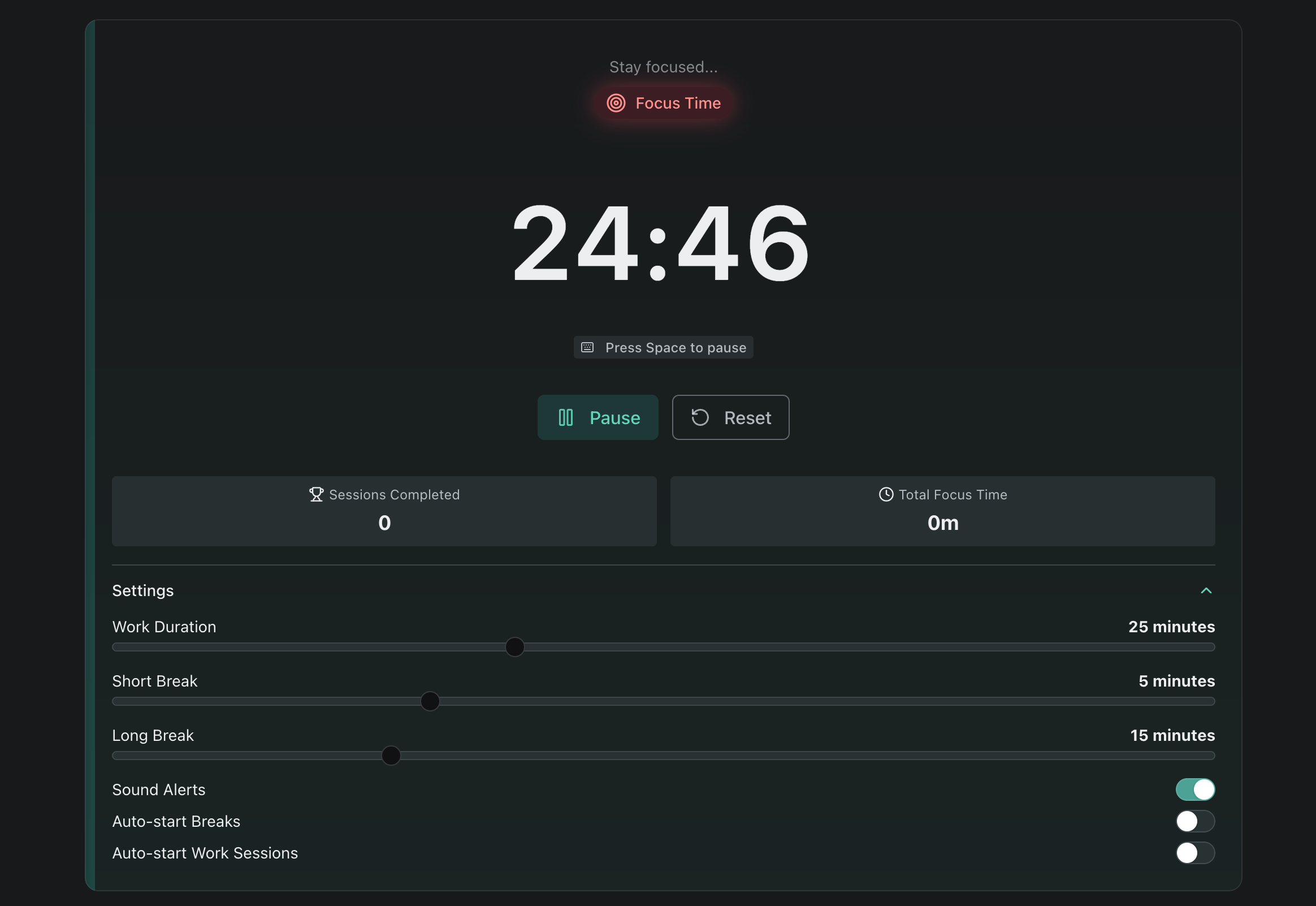
Try our Pomodoro Timer for a clean, distraction-free timer with session tracking. Features:
- Customizable work and break durations
- Visual progress indicator
- Audio notifications
- Session counter
- No ads or sign-ups required
Other productivity tools you might find useful:
- Countdown Timer – For custom time intervals
- Stopwatch – Track elapsed time for tasks
Advanced Tips for Pomodoro Masters
Batch Similar Tasks
Instead of:
[Email] [Code] [Email] [Meeting] [Email] [Code]

Try:
[Email × 2 Pomodoros] [Code × 3 Pomodoros] [Meeting] [Code × 2]

Context switching kills productivity. Batch similar tasks together.
Create Pomodoro Rituals
Start of day ritual (first Pomodoro):
1. Review goals for the day
2. Prioritize top 3 tasks
3. Clear inbox to zero
4. Plan Pomodoro allocation

End of day ritual (last Pomodoro):
1. Review what you accomplished
2. Note incomplete tasks
3. Plan tomorrow's priorities
4. Clear your workspace
Use the “Two-Minute Rule”
During a Pomodoro, if a quick task arises:
- Takes < 2 minutes? Do it immediately.
- Takes > 2 minutes? Add to your task list for later Pomodoro.

This keeps small tasks from cluttering your mind
while protecting focus for bigger work.
Measuring Your Progress
Track these metrics to improve over time:
Weekly Review Questions:
1. How many Pomodoros did I complete? (target: 40-50/week)
2. What was my estimation accuracy? (target: 80%+)
3. What caused the most interruptions?
4. Which times of day was I most productive?
5. What break activities worked best?

Adjust your approach based on answers.
Key Takeaways
- Start simple – Classic 25/5 works for most people
- Plan realistically – 8-10 Pomodoros is a productive day
- Protect your focus – Handle interruptions systematically
- Take breaks seriously – They’re essential, not optional
- Track and adjust – Find what works for your work style
Ready to boost your productivity? Try our free Pomodoro Timer and experience the power of focused work sessions.
→ Try Kestrel Tools Pomodoro Timer