Password Security in 2026: The Complete Guide to Creating and Managing Strong Passwords
Published on January 11, 2026 by The Kestrel Tools Team • 9 min read
“Password123” – still one of the most common passwords in 2026. Despite decades of security breaches, password reuse, and increasingly sophisticated attacks, many people continue using passwords that can be cracked in seconds. If you’ve ever wondered why security experts keep telling you to use longer, more random passwords, this guide will show you exactly why—and how to protect yourself.
The reality is stark: a 6-character lowercase password can be cracked in milliseconds. But add length and complexity, and that same password becomes virtually uncrackable. Let’s dive into the science of password security and learn how to create passwords that actually protect you.
Why Password Security Matters More Than Ever
The Evolution of Password Cracking
Password cracking has evolved dramatically. What once required expensive supercomputers can now be done on consumer hardware:
Modern GPU (RTX 5090) can test:
- 100+ billion MD5 hashes per second
- 30+ billion SHA-256 hashes per second

What this means for your password:
"password"     → Cracked instantly (in breach databases)
"P@ssw0rd"     → Cracked in seconds (common substitution)
"Tr0ub4dor&3"  → Cracked in hours (predictable pattern)
"j8#kL9$mN2@pQ" → Years to centuries (true random)
The Cost of Weak Passwords
Average cost of a data breach: $4.45 million (2025)
81% of breaches involve weak or stolen passwords
60% of people reuse passwords across multiple sites
Average person has 100+ online accounts

One weak password = potential access to everything you own
Understanding Password Strength
What Makes a Password Strong?
Password strength is measured in entropy – the amount of randomness or unpredictability. Higher entropy = stronger password.
Entropy (bits) = log₂(possible combinations)

Character sets and their sizes:
- Lowercase only (a-z):     26 characters
- + Uppercase (A-Z):        +26 = 52 characters
- + Numbers (0-9):          +10 = 62 characters
- + Symbols (!@#$%...):     +32 = 94 characters

8-character password entropy:
- Lowercase only: 26⁸ = 209 billion combinations (37 bits)
- Mixed case + numbers: 62⁸ = 218 trillion combinations (48 bits)
- All characters: 94⁸ = 6 quadrillion combinations (52 bits)
The Power of Length
Length beats complexity. A longer simple password often beats a shorter complex one:
Password Comparison:

"P@$$w0rd" (8 chars, complex)
- Entropy: ~30 bits (common substitutions reduce it)
- Crack time: Hours to days

"correcthorsebatterystaple" (25 chars, simple words)
- Entropy: ~44 bits (4 random words)
- Crack time: Years to decades

"k8#Lm9$nP2@qR5&tY7*" (20 chars, random)
- Entropy: ~131 bits
- Crack time: Longer than the universe exists
Types of Password Attacks
Understanding how passwords are cracked helps you create better ones:
1. Brute Force Attack
Method: Try every possible combination
a, b, c, ... aa, ab, ac, ... aaa, aab...

Defense: Use longer passwords
- 8 characters: 94⁸ = 6 quadrillion combinations
- 12 characters: 94¹² = 475 sextillion combinations
- 16 characters: 94¹⁶ = 37 octillion combinations

Each additional character multiplies crack time by 94x
2. Dictionary Attack
Method: Try common words and passwords first
password, 123456, qwerty, letmein, admin...

Common patterns also tested:
Password1, P@ssw0rd, Summer2025!, Welcome123

Defense: Avoid dictionary words and common patterns
Use truly random characters or random word combinations
3. Rainbow Table Attack
Method: Pre-computed hash lookup tables
Instead of computing: password → 5f4dcc3b5aa765d61d8327deb882cf99
Just look it up in a table!

Defense: Use passwords not in rainbow tables
- Long random passwords aren't in tables
- Sites should use salted hashes (adds unique value to each password)
4. Credential Stuffing
Method: Use breached username/password pairs on other sites
You used "cat123" on Site A (which got breached)
Attackers try "cat123" on Sites B, C, D, E, F...

Defense: NEVER reuse passwords across sites
Each account needs a unique password
5. Social Engineering
Method: Guess based on personal information
Pet names: fluffy2020
Birthdays: john0315
Favorite teams: yankees99
Address numbers: elm123street

Defense: Never use personal information in passwords
Random passwords have no personal connection
Creating Strong Passwords
Method 1: Random Character Generation
The most secure approach—use a password generator:
Recommended length: 16+ characters
Include: uppercase, lowercase, numbers, symbols

Examples of strong random passwords:
k8#Lm9$nP2@qR5&t
Yx7!Kp$3mN@9Lq2W
Bf#5Rx@9Tm$2Np7K

These have ~105 bits of entropy
Would take trillions of years to crack
Method 2: Passphrase Method
Memorable yet secure—combine random words:
Method: Use 4-6 random words (not related phrases)

❌ Bad passphrases (predictable):
 "ilovemydog" (common phrase)
 "onetwothreefour" (sequential)
 "tobeornottobe" (famous quote)

✅ Good passphrases (random words):
 "correct horse battery staple"
 "wizard bloom carpet frozen"
 "velvet thunder pickle ancient"

Even better - add some randomness:
 "correct2Horse!battery_staple"
 "Wizard-bloom7Carpet#frozen"
Method 3: Sentence Method
Create passwords from memorable sentences:
Start with a memorable sentence:
"I graduated from Harvard in 2015 with honors!"

Take first letter of each word + numbers + symbols:
"IgfHi2015wh!"

Enhance with substitutions:
"1gfH!2015wh!"

Result: 12 characters, memorable, relatively strong
(But still not as strong as true random)Password Management Best Practices
1. Use a Password Manager
Benefits:
✓ Generate strong unique passwords for every site
✓ Remember hundreds of passwords for you
✓ Auto-fill credentials securely
✓ Alert you to breached passwords
✓ Sync across all devices

Popular options (2026):
- 1Password
- Bitwarden (open source)
- Dashlane
- LastPass

You only need to remember ONE master password
2. Master Password Best Practices
Your master password should be:
1. Long: 20+ characters minimum
2. Memorable: You can't look it up!
3. Unique: Never used anywhere else
4. Random: Not predictable

Good master password strategy:
- Use a passphrase: "purple-elephant-dancing-42-moons!"
- Add personal randomness only you'd know
- Practice typing it until it's muscle memory

Store backup in a physical safe (not digitally)
3. Enable Two-Factor Authentication (2FA)
2FA adds a second layer of security:
Something you know (password) + Something you have (phone/key)

Types of 2FA (best to worst):
1. Hardware keys (YubiKey) - Most secure
2. Authenticator apps (Google Authenticator, Authy)
3. SMS codes - Better than nothing, but vulnerable

Enable 2FA on:
✓ Email (most critical!)
✓ Financial accounts
✓ Social media
✓ Password manager
✓ Any account with sensitive data
4. Check for Breaches Regularly
Check if your credentials have been breached:
- haveibeenpwned.com - Check email addresses
- Your password manager's breach monitoring

If breached:
1. Change password immediately on that site
2. Change password on any site where you reused it
3. Enable 2FA if available
4. Monitor accounts for suspicious activity
Common Password Mistakes
Mistake #1: Using Personal Information
❌ Easily guessed from social media:
 - Pet names: "fluffy2020"
 - Birthdays: "mike0315"
 - Anniversaries: "married2018"
 - Children's names: "emma&jack"
 - Addresses: "elm123st"
 - Phone numbers: "5551234"

✅ Use completely random characters
 - No connection to your life
 - Can't be guessed from research
Mistake #2: Common Substitutions
❌ These substitutions are well-known to crackers:
 a → @, 4
 e → 3
 i → 1, !
 o → 0
 s → $, 5

"P@$$w0rd" is barely better than "Password"
Crackers try these substitutions automatically

✅ Use truly random placement of special characters
Mistake #3: Keyboard Patterns
❌ Common patterns attackers check:
 "qwerty", "qwertyuiop"
 "asdfgh", "asdfghjkl"
 "zxcvbn"
 "1qaz2wsx"
 "!QAZ@WSX"

These look random but aren't
Pattern-based attacks crack them quickly

✅ Use actual randomness, not visual patterns
Mistake #4: Sequential or Repeated Characters
❌ Sequential patterns:
 "123456", "abcdef", "111111"
 "abc123", "password1234"

❌ Year patterns:
 "Summer2025", "Company2026"

These are among the first combinations tried

✅ Each character should be independent of the others
Password Strength Tiers
Tier 1: Critical (use strongest possible)
- Email accounts (gateway to password resets)
- Financial accounts (banks, investments)
- Password manager master password
Recommendation: 20+ characters, random, unique

Tier 2: Important (use strong)
- Social media
- Shopping sites with saved payment
- Work accounts
Recommendation: 16+ characters, random, unique

Tier 3: Standard (use reasonably strong)
- Forums, newsletters
- Services without sensitive data
Recommendation: 12+ characters, unique

NEVER reuse passwords across tiers
Tools and Resources
Creating truly random passwords by hand is nearly impossible—our brains are wired to create patterns. That’s why using a dedicated password generator is essential.
Why Use a Password Generator?
- True randomness – Cryptographically secure random generation
- Customizable options – Set length, character types, avoid ambiguous characters
- Instant generation – Create strong passwords in one click
- No tracking – Generate passwords without them being stored anywhere
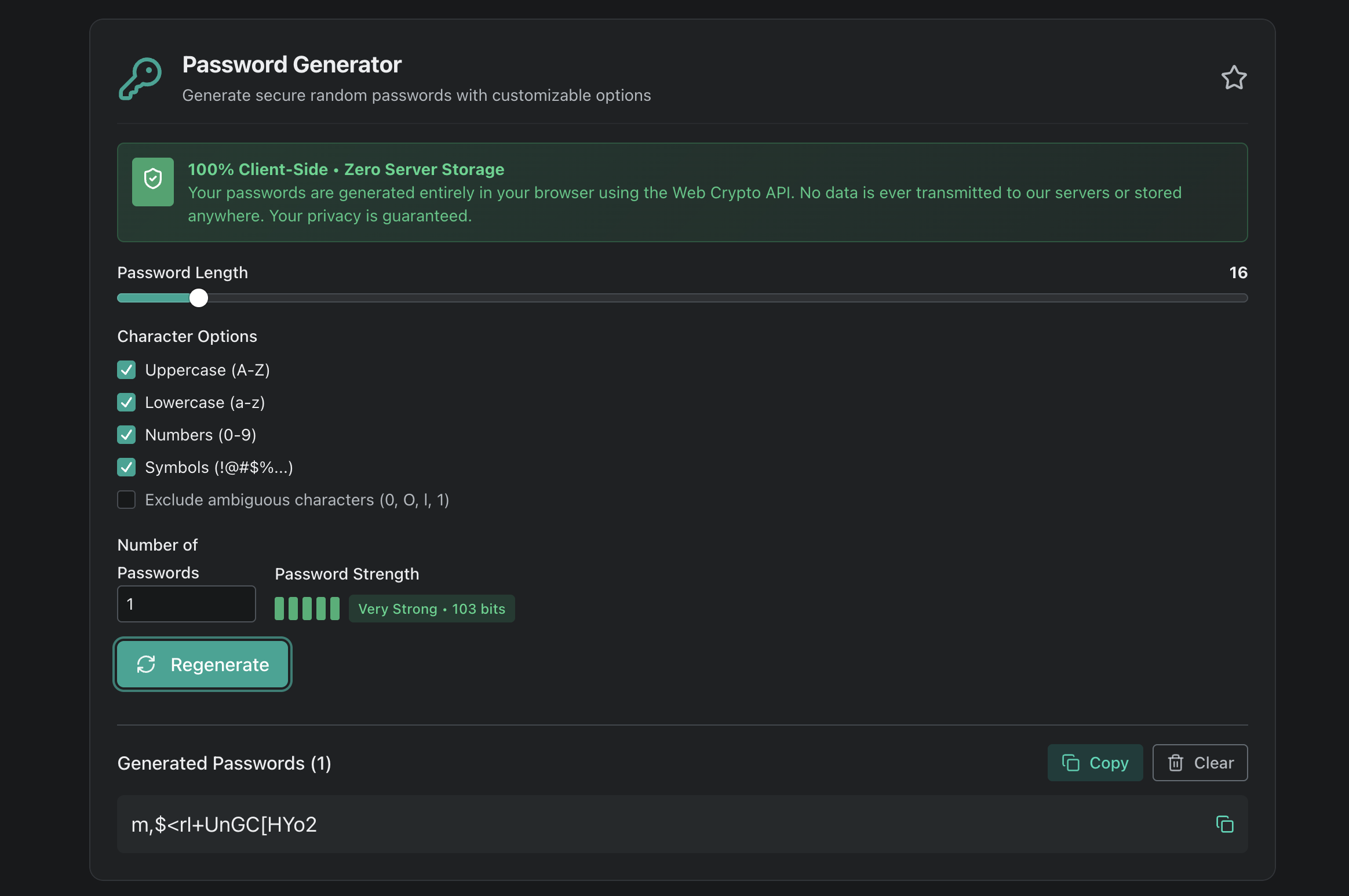
Try our Password Generator for instant, secure password creation with:
- Customizable length (8-128 characters)
- Character type selection (uppercase, lowercase, numbers, symbols)
- Password strength indicator
- One-click copy to clipboard
- 100% client-side (your passwords never leave your device)
Related security tools:
- Hash Generator – Create cryptographic hashes for data integrity
- UUID Generator – Generate unique identifiers
Quick Reference Guide
DO:
✓ Use 16+ character random passwords
✓ Use a password manager
✓ Enable 2FA everywhere possible
✓ Use unique passwords for every account
✓ Check for breaches regularly
✓ Change passwords if compromised

DON'T:
✗ Use personal information
✗ Use dictionary words
✗ Use common substitutions (@ for a)
✗ Use keyboard patterns
✗ Reuse passwords across sites
✗ Share passwords (even with family)
✗ Store passwords in plain text
Key Takeaways
- Length is king – 16+ characters is the new minimum for important accounts
- True randomness matters – Use a password generator, not your imagination
- Never reuse passwords – One breach shouldn’t compromise everything
- Use a password manager – It’s the only practical way to have strong unique passwords
- Enable 2FA everywhere – Add a second layer of protection
- Stay vigilant – Check for breaches and update compromised passwords immediately
Ready to create uncrackable passwords? Try our free, no-tracking password generator and secure your digital life today.
→ Try Kestrel Tools Password Generator